
Create an API flow session for a user subscription payment.
| Time | Status | User Agent | |
|---|---|---|---|
Retrieving recent requests… | |||
This section covers the subscription flow process. To initiate a subscription purchase, use this endpoint as a starting point. When accessing this API, it is recommended to use a User Access Token obtained from the corresponding User Creation & Access Token API response.
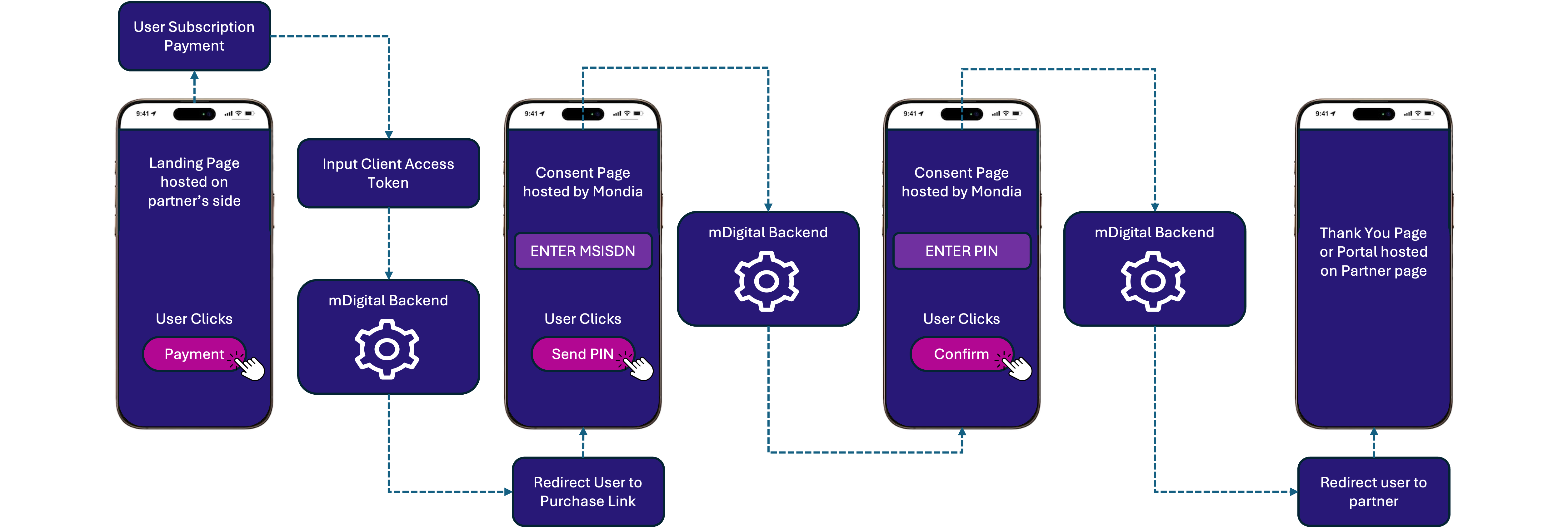
Subscription Payment Process
To create an API flow session for user subscription payment, follow these steps:
1. Set the Request Details
- URL:
https://stg-gw.mondiapay.com/v1/api/purchase/subscription/oneClick
2. Add the Required Headers
Authorization Header: Fill in the Authorization header with the user access token obtained from the User Creation & Access Token API request, formatted as follows:
Bearer U1234abcde-1234-abcd-1234-abcd1234abcd
| Header | Value |
|---|---|
| Content-Type | application/json |
| x-api-key | Your API Key |
| Authorization | Generated User Access Token |
3. Prepare the Request Body
Replace lang, subscriptionTypeId, & marketingCampaign in the body with your specific configuration values.
| Request Body | Description | Required |
|---|---|---|
marketingCampaign | Marketing campaign information used for the acquisition. | Optional |
lang | The two-letter ISO-639-1 language code - defaults to client's default language | Yes |
subscriptionTypeId | The Id of the subscription type (same as typeId returned in the Product endpoint) | Yes |
4. Make the Request
Once you’ve set the URL, headers, and body, proceed with a POST request.